Campaigns set their own rates and rules. Many clips earn little or nothing. JustClip doesn't promise earnings.
Neither Content Rewards nor Whop wrote this page. It's a clipper's reading of their own pages, mainly the help-centre article "What's new" (updated 8 Nov 2026). Every page was read on 9 Nov 2026, and each quote is copied as the page stood that day, next to the date the page itself gives. This page leaves out fee rates, budgets and payout timings, because the official pages already print them.
What changed in the Content Rewards update, and when?
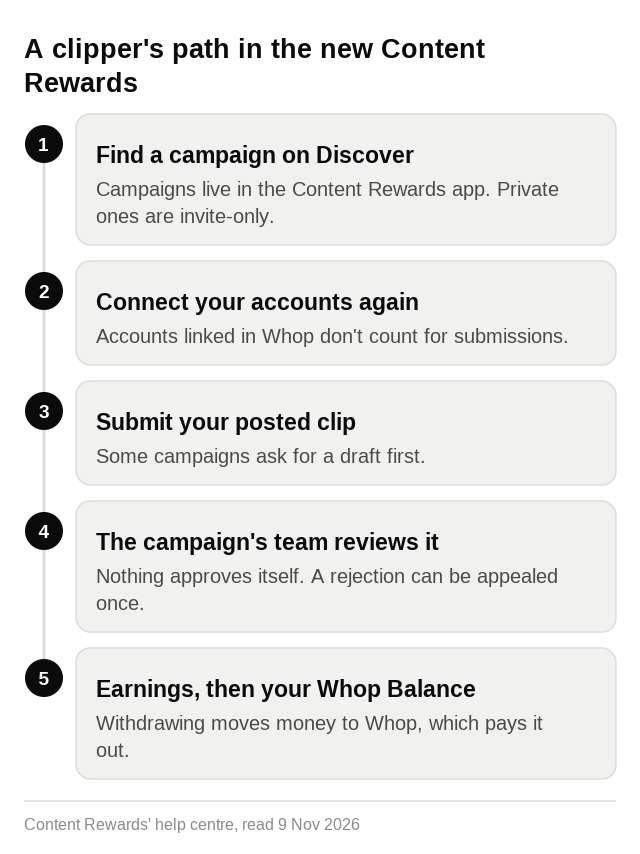
Content Rewards is now a separate, rebuilt app. You find campaigns on Discover, connect your accounts again inside the app, and each campaign's own team reviews your clips; withdrawals go to your Whop Balance. "What's new" (updated 8 Nov 2026) opens with: "Content Rewards has been rebuilt. Your account carried over, and campaigns from the previous version keep running on their original terms."
The help centre gives no date for the rebuild. Content Rewards' About page (updated 7 Nov 2026) dates its own app: "In August 2026 we launched our own app at contentrewards.com." The same page says Content Rewards started on Whop in late 2024.
| Change | Date its source gives | Clipper step it touches | Source (read 9 Nov 2026) |
|---|---|---|---|
| Content Rewards starts on Whop | Late 2024 | All steps | Content Rewards, About page |
| "Content Rewards is live!" | 4 Mar 2025 | Finding campaigns | Whop, Releases |
| AI review, auto-approve and bot detection on the previous version (the current help centre says nothing approves itself) | 12 and 20 May 2025 | Approval, payout | Whop blog, "What's new on Whop?" posts |
| Its own app at contentrewards.com | August 2026 | Finding campaigns | Content Rewards, About page |
| New payout rule for clips sent from this date; earlier clips keep the old rule | 25 Sep 2026 | Payout | Content Rewards help, "Payouts" |
| Creator Terms updated; campaigns joined on the Whop-hosted experience stay on the prior terms | 4 Oct 2026 | All steps | Content Rewards, Creator terms of service |
| Campaigns live on the Discover page | Not dated | Finding campaigns | Content Rewards help, "What's new" |
| Accounts are connected again in the app; accounts linked in Whop don't count | Not dated | Submitting | Content Rewards help, "What's new" |
| The campaign's own team reviews, nothing approves itself, one appeal per rejection | Not dated | Approval | Content Rewards help, "What's new" |
| Earnings in three sections; withdrawing sends money to the Whop Balance | Not dated | Payout | Content Rewards help, "What's new" |
| The creator fee differs between carried-over and newer campaigns | Not dated | Payout | Content Rewards help, "What's new" |
| "Whop Clips has moved to ContentRewards.com" | Not dated | Finding campaigns | Whop blog, "Whop Clips" |
Is it called the Content Rewards v2 update?
Content Rewards' help pages don't call it that. None of the ones read on 9 Nov 2026 uses "v2"; they say "the new version", "the previous version" and "the upgrade".
What does Whop say about the update?
Whop's own posts about Content Rewards date from 2025 and describe the previous version. Its Releases page lists Content Rewards on 4 Mar 2025 and 14 May 2025 and has no entry for the rebuild. Whop's "Whop Clips" blog post now says: "Whop Clips has moved to ContentRewards.com." It doesn't say when the move happened.
Content Rewards vs Whop: which app does what now?
After the update you find campaigns, connect accounts, follow review and track earnings in the Content Rewards app. Whop comes in at the end: withdrawing sends the money to your Whop Balance. The sources put each step like this:
- To find campaigns, go to Discover. "Campaigns live on the Discover page", where you filter by platform, model and category, read the brief, then press Join campaign or Apply ("What's new" and "Find and apply to a campaign", both updated 8 Nov 2026).
- Before you submit, connect your accounts again. "Accounts linked in Whop do not count for submissions" ("What's new"), and connected social accounts didn't carry over: "you re-link each one inside the new app before you can submit with it" ("What happened to your previous-version submissions and payouts", updated 8 Nov 2026).
- Approval sits with the campaign. "Every clip you submit is reviewed by the campaign's own team", and Content Rewards "does not approve clips" ("Approval and review", updated 8 Nov 2026).
- Your money shows on the Earnings page as Queued while a clip is still earning, Arriving once the amount is final, and Received when it is in your Content Rewards Balance; "withdrawing sends it to your Whop Balance" ("What's new"). From the Whop Balance you send it on to wherever you want the money ("How your payout fees work", updated 8 Nov 2026).
- Campaigns you joined on "that Whop-hosted experience" stay under the prior Clippers Terms of Service (Creator Terms, last updated 4 Oct 2026).
Content Rewards' About page (updated 7 Nov 2026) adds: "You can still use Content Rewards inside Whop, and a lot of people do." That line and the help centre's line about accounts linked in Whop are worded differently, so check the official pages for the campaign you're in.
Whop Content Rewards not showing or not working: where are campaigns listed now?
Campaigns are listed on Discover in the Content Rewards app, except private ones, which reach you by the brand's invitation. Accounts linked in Whop have to be connected again in the app. Content Rewards' help centre (updated 8 Nov 2026) deals with these cases:
- A private campaign won't show up on Discover: "They don't appear on Discover, and you reach them only through an invitation from the brand, sent to you directly or shared as an invite link."
- If your account shows as not linked, the help centre's answer is that "Whop and Content Rewards are separate connections." Connect it again inside Content Rewards: Settings, then Connected accounts, then Connect account.
- A clip waiting on review is with the campaign's own team, and the help centre says to press Support on the campaign page to message them.
Anything else goes through Help & Support, "the chat bubble in the corner of this page and of the app" ("What's new"). This page keeps no outage list and can't tell you whether Content Rewards is down right now; that chat is the official place to ask.
What are the Content Rewards fees after the update, and who pays them?
Each side pays its own fee. Clippers pay a "creator fee", and brands pay a "platform fee" plus Whop's processing fee. The rates aren't here because they differ by campaign and the help centre publishes them.
- For clippers, the creator fee is "taken when a payout settles. Nothing else comes off on our side" ("How your payout fees work", updated 8 Nov 2026). The rate differs between campaigns that started on the previous version and newer ones, and some per post and retainer campaigns charge none.
- For brands, the platform fee comes out of the campaign budget the brand funds, and Whop's payment processing fee applies to money coming in ("What Content Rewards costs", updated 25 Oct 2026). Verified organizations pay a lower rate. Creators' fees come out of their own side of a payout, "so it never changes what you pay".
- Moving money from the Content Rewards Balance to the Whop Balance is free. The onward withdrawal from Whop carries "the payment provider's" fee ("How your payout fees work").
For the actual numbers, read those two help articles and check their dates.
How do approval and payout work after the update?
Each campaign's own team reviews its clips, and you can appeal a rejection once. "Approval and review" (updated 8 Nov 2026) says: "Every clip you submit is reviewed by the campaign's own team, who approve or reject it against the requirements written on the campaign, and nothing is approved on its own." On timing it says: "There's no fixed time on a review, which is why the wait still varies from one campaign to the next."
In the app, each clip sits under Approved, Pending or Rejected, and a rejected clip shows the team's reason ("What's new"). "Approval and review" sets out the appeal:
- Open the clip on your Submissions page and read the team's reason.
- Tap Start appeal on the clip; "any rejection can be appealed once in the app".
- Content Rewards' own appeals team decides. The exception is a verified agency, which makes the final call on its own rejections, so ask that agency's team about those.
For what each rejection reason means, see rejected submissions explained.
What does a flag on a clip mean?
A flag isn't a rejection. It pauses the clip's payout until a person on Content Rewards' team has looked at it. The brand-side "Review submissions" page (updated 26 Oct 2026) says a flag "freezes the clip's payout and sends the case to our team, who either dismiss it, so the payout resumes, or uphold it". The same page says the creator isn't shown the flag. The Creator Terms let you file one appeal per flagged submission.
What changed about payout timing?
Content Rewards' "Payouts" article (updated 8 Nov 2026) dates a rule change: clips sent from 25 September 2026 pay in rounds, and clips sent before that keep the old rule. The timings are in that article, and it's the place to read how campaigns pay.
Which older pages still describe the previous version?
Whop's guide to Content Rewards (8 Jul 2025) still says submissions auto-approve. Some help-centre pages updated in October 2026 still describe the older payout rule, and the Creator Terms and the help centre give different answer times for appeals. Where they disagree, "What's new" and the help pages it points to are the newest, updated 8 Nov 2026.
What does the update mean for the clipping step?
The update changed where campaigns are listed and how clips are reviewed and paid. What you're allowed to clip is the same as before, and any editor still works for cutting the clip before you post and submit it.
JustClip can help with that step: paste a Twitch, Kick or YouTube link, or upload a file. YouTube links are fetched on Pro, Studio and pack-only accounts; on Clipper you upload the file. You get captioned vertical clips with written hooks, ranked best first, each with a "why this clip" note. You can clip your own streams and videos with AI and then post and submit them as each campaign's brief asks.
JustClip is for your own streams and videos, or footage you're allowed to clip: the creator's campaign or their written OK.
Campaigns set their own rates and rules. Many clips earn little or nothing. JustClip doesn't promise earnings.