Campaigns set their own rates and rules. Many clips earn little or nothing. JustClip doesn't promise earnings.
What is TikTok's unoriginal content policy? (Integrity and Authenticity, read 2 Nov 2026)
TikTok's unoriginal content policy is the rule in its Community Guidelines that makes content ineligible for the For You feed if it "includes unoriginal or reused material without anything new". It sits in the Integrity and Authenticity section, released 25 Aug 2026 and in force from 24 Sep 2026 (read 2 Nov 2026).
The section opens with who may post: "You should only post content you created or have the right to share." TikTok's pages shorten the For You feed to FYF.
What counts as unoriginal content on TikTok? Two TikTok pages list it, and this is their wording:
| TikTok page | What it lists as unoriginal |
|---|---|
| Community Guidelines (For You) | "Reused or unoriginal content posted without creative edits, such as clips that show someone else's watermark or logo" |
| Community Guidelines (For You) | "Low-quality or minimally edited content, such as short clips made from GIFs only" |
| Creator Academy | "Content copied completely from others." |
| Creator Academy | "Content that is largely repurposed from another source without adding any creative edits." |
| Creator Academy | "Content combined from multiple sources with little or no additional information and/or content value." |
| Creator Academy | "Content with someone else's visible watermark or superimposed logo." |
So what counts as original content on TikTok? TikTok only describes the opposite: material "without anything new", reused content "without creative edits", content repurposed "without adding any creative edits". Its pages don't say which edits make a clip original, and this guide won't guess. Creator Academy (updated 26 Sep 2026, read 2 Nov 2026) gives the effect: "Unoriginal content may be removed from the For You feed, making it harder to discover."
You may see this rule called "low quality QR code content", but TikTok's guidelines and help pages read on 2 Nov 2026 don't mention QR codes at all. The low-quality wording TikTok does use is the table's second row: "Low-quality or minimally edited content".
Does unoriginal content affect Creator Rewards? (Creator Academy, read 2 Nov 2026)
Yes. The FAQ on the Creator Rewards Program page (Creator Academy, updated 11 Sep 2026, read 2 Nov 2026) says "content ineligible for the For You feed will not be eligible for the Creator Rewards Program", including:
- Unoriginal: "Your account info or video content is copied from others or has minimal original input or edits."
- Low quality: "Your account info or video content includes split screens, meaningless reactions, low-quality images, or slide videos."
The same page says content "must be original, high-quality content" and "Ads, paid promotions, or sponsored content do not qualify." Creator Academy's originality page (updated 26 Sep 2026) adds that the program uses "originality" as a key metric in its rewards formula. The other entry conditions are on TikTok's page.
What changed in 2026? TikTok's archive, checked 2 Nov 2026
The 2026 version changed the date on TikTok's unoriginal content rule but kept the words. TikTok's Community Guidelines archive (read 2 Nov 2026) lists only two versions, and the unoriginal content section reads word for word the same in both. There is no 25 Sep 2026 revision.
How we checked: on 2 Nov 2026 we opened the archive and the archived 2025 version of the Integrity and Authenticity page in a browser, and read its unoriginal content section and its two For You rows against today's, line by line.
| Version | Dates on TikTok's page | The unoriginal content section |
|---|---|---|
| Current | Released 25 Aug 2026, effective 24 Sep 2026 | The rule and the two For You rows quoted above |
| Previous (archived) | Released 14 Aug 2025, effective 13 Sep 2025 | Word for word the same as the current version |
| A 25 Sep 2026 revision | Not listed in TikTok's archive | Not a version TikTok's archive lists |
Stuck at 0 views on TikTok? Check For You eligibility first
Check your analytics before you assume a penalty. If TikTok made a video ineligible for the For You feed, "a warning bar appears at the top of the Performance tab", according to Creator Academy's Moderation and Appeals page (updated 26 Sep 2026, read 2 Nov 2026).
Low views on their own don't mean you broke a rule. TikTok's For You feed Eligibility Standards (effective 24 Sep 2026, read 2 Nov 2026) put it this way: "If a video isn't getting many views, it also doesn't necessarily mean it broke a rule. Creators can check TikTok's analytics to see how their videos are performing, including if there were any made ineligible for recommendation." The same page says people may still find such a video through search or by going to your account.
TikTok's help (For You feed eligibility, read 2 Nov 2026) says TikTok tells you the reason and gives you a chance to appeal, but "You'll need to turn on analytics in your TikTok settings to view our decision." To turn on analytics:
- In the TikTok app, tap Profile at the bottom.
- Tap the Menu button at the top, then select TikTok Studio.
- Tap Get started within Analytics.
- Tap Turn on.
If there's no warning bar, Creator Academy's originality page says low views may come from "a lack of community engagement rather than being ineligible for the FYF." If there is one, TikTok's route is feedback and then an appeal (below), rather than posting the video again: its rule lists "Reused or unoriginal content posted without creative edits" as not eligible for For You.
How do you appeal TikTok's unoriginal content decision? (TikTok's help, read 2 Nov 2026)
You appeal from the notice in your analytics: open the post's Analytics, tap the notification for the ineligible post, then tap Appeal (TikTok Help Center, For You feed eligibility, read 2 Nov 2026). Appeal only if the footage is yours or you have the right to share it, and you think TikTok got it wrong.
Read the reason first. The same notification asks whether you understand why the post isn't eligible, with a Yes or No answer, and TikTok's help adds: "You can also submit an appeal after submitting feedback on why you disagree with our decision." TikTok's four appeal steps:
- In the TikTok app, go to the post that isn't eligible for the For You feed.
- Tap More insights at the bottom, or tap the More options (...) button on the side of the post, then tap Analytics.
- Tap the notification for the ineligible post.
- Tap Appeal at the top and follow the steps to submit your appeal.
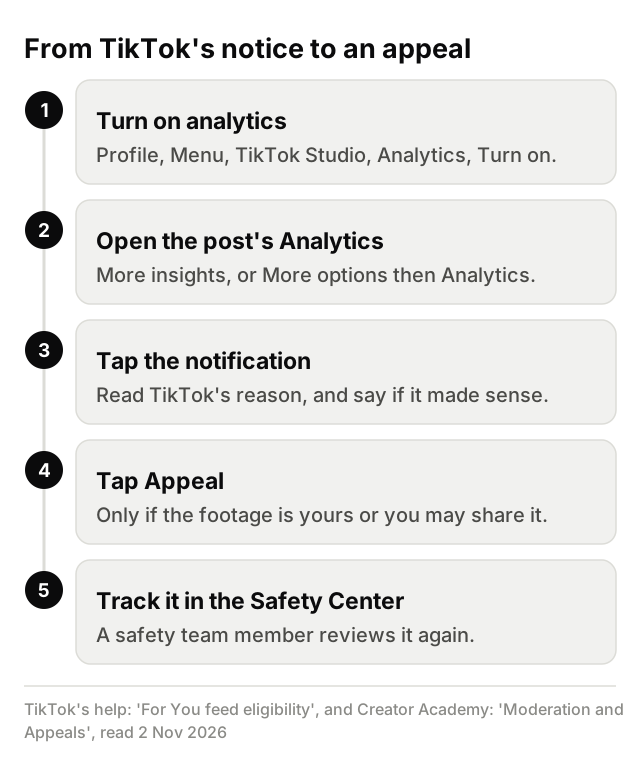
Creator Academy's Moderation and Appeals page (updated 26 Sep 2026) describes what happens next: "A member of our safety team will review the content again against our Community Guidelines, and we'll notify you of the outcome." You can track the appeal in the in-app Safety Center. If it succeeds, TikTok's help says the post becomes eligible for recommendation in the For You feed again. Nobody can promise how an appeal turns out.
TikTok's Help Center (Content violations and bans) offers the appeal "if you believe we've made a mistake". It isn't a route for footage you had no right to post.
Appeal rejected? What TikTok's pages say (read 2 Nov 2026)
TikTok's Help Center and Creator Academy pages read on 2 Nov 2026 describe no second appeal and no next step after an appeal is turned down, and nobody can promise a different outcome. For a For You decision, the only other thing TikTok's help mentions is the feedback step in the same notice (Yes or No on whether you understand why). Its pages don't say what that feedback changes. Three TikTok lines apply:
- "Note: Deleting your violative content does not remove the violation" (Help Center, Content violations and bans).
- "If your account is restricted or banned, you may not create or use another account to get around it." (Community Guidelines, Integrity and Authenticity)
- Circumvention includes "Using another account to avoid restrictions, such as comment blocks or FYF-ineligible content restrictions" (same page).
Clipping for a campaign? Its permission doesn't cover originality
A campaign's permission settles whose footage you may post. It says nothing about whether the clip is original. TikTok's Integrity and Authenticity guideline (in force 24 Sep 2026, read 2 Nov 2026) asks for content you created "or have the right to share" and, in a separate rule, makes reused material "without anything new" ineligible for For You. Nothing on TikTok's pages read on 2 Nov 2026 exempts campaign posts, whatever the format, and that includes slideshows.
If reposted clips get a campaign account restricted or banned, the account rule quoted above applies: you can't use another account to get around it.
Paid campaign posts are ads. Here is how TikTok and two regulators say to label them:
- TikTok's Help Center (Promoting a brand, read 2 Nov 2026) says you "must turn on the content disclosure setting" when promoting a third-party brand "in exchange for payment or any other incentive". Branded content for another business gets the "Paid partnership" label, and "If you don't display the proper disclosure, we may remove or restrict your posts."
- The FTC's "Disclosures 101 for Social Media Influencers" (read 2 Nov 2026) says a video's disclosure belongs in the video, not just the description, in plain words such as "ad" or "sponsored". Its Endorsement Guides FAQ (read 2 Nov 2026) says "it's always best to add your own disclosure even if a platform offers its own disclosure tool."
- In the UK, the ASA's CAP Code guidance "Recognising ads: Social media and influencer marketing" (dated 6 Aug 2026, read 2 Nov 2026) says paid content must be obviously identifiable as advertising, labelled upfront with a word like "Ad". A platform's paid-partnership label may not be enough on its own.
To turn on TikTok's label in the app: on the post screen, tap Content disclosure and ads (or More options (...), then Content disclosure and ads), turn Disclose commercial content on, select Branded content, then tap Save and Continue. You can't change the label after posting. TikTok's help also says: "Turning on the content disclosure setting won't affect the distribution of your post in feeds on TikTok."
Each campaign's own page sets how campaigns work for it, such as which footage and platforms it covers and which labels it asks for. You never need JustClip to join a campaign or get paid.
Clip only your own streams and videos, or footage you're allowed to clip: the creator's campaign or their written OK.
Campaigns set their own rates and rules. Many clips earn little or nothing. JustClip doesn't promise earnings.
What about clipping your own streams and videos?
Your own footage meets the first part of TikTok's rule, "content you created". The For You rule on material "without anything new" still applies to everyone, though, and TikTok decides each post.
JustClip is for your own streams and videos, or footage you're allowed to clip: the creator's campaign or their written OK.
JustClip turns your long streams and videos into captioned vertical clips with written hooks, ranked best first, each with a "why this clip" note. It doesn't make a clip original or eligible for the For You feed. That's TikTok's call, under the rule quoted above. JustClip is optional, and you can clip your own streams and videos with AI when it helps.
Posting the same clips on YouTube too? YouTube's reused content rule has its own wording and its own appeal route.