Campaigns set their own rates and rules. Many clips earn little or nothing. JustClip doesn't promise earnings.
A Content Rewards submission is the link to a post you made for a campaign, sent in for the campaign's owner to approve or reject. Content Rewards operates the campaigns, submissions and view checks under its Creator Terms (last updated 4 Oct 2026, read 29 Oct 2026); the brand decides on each submission. Whop is the separate company it uses for payment and money movement. Content Rewards also operates an earlier version of the experience inside Whop's platform, so this guide talks about Whop campaigns too.
Every answer below comes from the platforms' own terms and help pages, each read on 29 Oct 2026 and dated where it's quoted. When two pages word the same rule differently, this guide names both. It leaves out rates, caps and durations on purpose, because each campaign sets or shows its own.
Who reviews a Content Rewards submission, and what does 'approved' mean?
The campaign's owner, the brand or its campaign manager, approves or rejects every Content Rewards submission; views don't approve anything on their own. Section 7.2 of the Creator Terms (read 29 Oct 2026) says: "The Organization decides whether to approve or reject each Submission." The terms define the Organization as the business or individual running or funding the campaign, including an agency acting for a brand. Content Rewards' creators FAQ (read 29 Oct 2026) says the brand or their campaign manager reviews every submission, and "nothing approves automatically."
What happens to a submission after you send it?
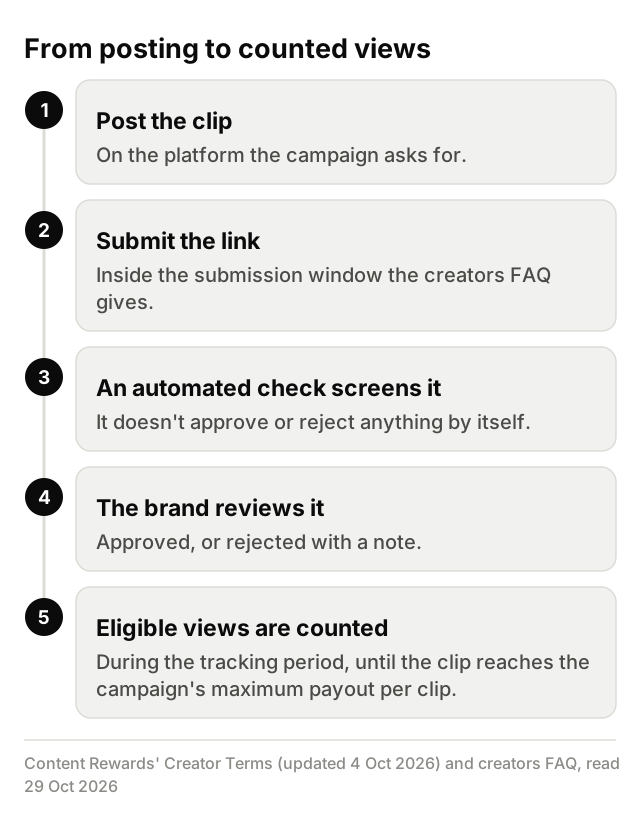
Here's the order the Creator Terms and the creators FAQ (both read 29 Oct 2026) describe:
- You post the clip on the platform the campaign asks for.
- You submit the post's link inside the submission window the creators FAQ gives.
- An automated check screens it. Section 9.3 of the Creator Terms says that check "does not by itself approve or reject your Submission."
- The brand reviews it and approves or rejects it.
- If it's approved, it earns on eligible views counted during the tracking period, until it reaches the campaign's maximum payout per clip.
Some campaigns turn on pre-post review: you upload a draft before posting, and the brand can approve it, reject it or ask for changes (section 8.2 of the Creator Terms). An approved draft still isn't final approval. Section 8.4 of the Creator Terms says "Draft approval is not final approval of the published Submission and does not guarantee payment." Section 7.2 adds that approving a draft doesn't guarantee approval of the published post.
For campaigns joined on the Whop-hosted version, the Creator Terms say the prior Clippers Terms of Service still apply, and Whop's own Content Rewards Program Terms (read 29 Oct 2026) cover the program on Whop. Those Program Terms say that if the seller doesn't review a submission within a reasonable time, Whop may approve or reject it, including by automated means. Whop's Content Rewards docs describe that version too. The FAQ quoted above is Content Rewards' current one.
A rejection comes with a note, though not every set of terms guarantees a reason in it. Content Rewards' FAQ (read 29 Oct 2026) lists the usual reasons and adds: "The rejection note says which." Whop's Program Terms say the notification "may include the reason for rejection", so on the Whop-hosted side you may not get one.
Why can a clip be rejected after it got views?
A clip with views can be rejected because the brief decides approval, not the view count. Content Rewards' creators FAQ (read 29 Oct 2026) says "Only approved posts get paid", and the brand checks each post against its own campaign rules however many views it already has. A clip that took off can still miss the brief.
The FAQ's answer to "Why was my submission rejected?" names the usual causes. Its answer on submitting adds a deadline, and the campaign's brief adds the rest:
- The post went up on a different app from the one the campaign asked for.
- Tags or disclosure are missing. The brief says which tags it wants, and section 12.9 of the Creator Terms makes ad disclosure the creator's responsibility, including a clear disclosure at the start of the video. Content Rewards doesn't pre-approve clips for it, and the same section says non-compliance may mean rejection and loss of payment for that submission.
- The clip reuses content. The FAQ names reused content as a reason in its own right, and the brief says what the campaign expects to be new.
- The post was edited or deleted after you submitted it, which the FAQ also names.
- The link came in late. The FAQ's answer on submitting asks you to send the link within a set window after posting.
- The clip misses something else on the campaign page, and a clip has to meet all of it.
On the Whop-hosted side, a seller can reject only on set grounds. Whop's Program Terms (read 29 Oct 2026) say a seller may reject a submission only if it doesn't follow the offer's criteria or the Program Terms, if there's a reasonable suspicion of fraud, or if the campaign's maximum payout or end date has been reached. That last ground isn't about your clip at all: the campaign itself has run out or ended. The same terms also let Whop itself reject a submission at any time, including by automated means, if the Program Terms aren't followed or fraud is suspected.
Footage matters too. Clip only your own streams and videos, or footage you're allowed to clip: the creator's campaign or their written OK.
TikTok has its own originality rule on top of the campaign's. Its Integrity and Authenticity guideline (released 25 Aug 2026, effective 24 Sep 2026, read 29 Oct 2026) says content is "ineligible for the FYF if it includes unoriginal or reused material without anything new" (FYF is TikTok's For You feed), and that you should only post content you created or have the right to share. That rule decides where TikTok shows a post. It doesn't reject a submission by itself, and Content Rewards' FAQ lists reused content as a rejection reason in its own right.
Some views also never count, whatever the brief says. The next section covers which ones do.
Whop clipping views: which views count? Tracking windows, per-clip caps and eligible views
Paid views are eligible views on an approved clip, counted inside the campaign's tracking period, until the clip reaches the campaign's maximum payout per clip. That's how Content Rewards' Creator Terms and creators FAQ describe it, and Whop's Content Rewards docs and Program Terms also pay only approved submissions, only on legitimate views, up to a maximum payout (all read 29 Oct 2026). The table quotes or closely paraphrases each term and leaves its number out, since each campaign sets or shows its own.
What does each view term say?
| Term | What the source says | Source, read date |
|---|---|---|
| Approved clips only | "Only approved posts get paid." Whop's docs: after a submission is approved, Whop pays the creator based on the views it got. | Content Rewards creators FAQ; Whop's Content Rewards docs; read 29 Oct 2026 |
| Eligible views | Section 6.6, on pool campaigns: "Only eligible views recorded within the applicable tracking window count." Section 7.7, on recurring payouts by views: "views outside the payout period do not earn additional payouts." Whop counts only the legitimate views it determines a post got, and excludes views made, or suspected to be made, by bots, scripts or other automated means, and views obtained through prizes, payments or other inducements to the public. | Creator Terms, sections 6.6 and 7.7; Whop Content Rewards Program Terms; read 29 Oct 2026 |
| Tracking period | The terms say tracking normally runs a set number of days from submission unless the campaign sets a different monitoring period. The FAQ says that on CPM campaigns, which pay by views, a clip earns for a set number of days from approval. The two count from different starting points, so check the campaign page. | Creator Terms, section 7.7; Content Rewards creators FAQ; read 29 Oct 2026 |
| Per-clip maximum | On CPM campaigns, which pay by views, the brand may set a minimum a clip must earn before it's paid and a maximum it can earn. The FAQ: each campaign sets a maximum payout per clip, shown on the campaign page, and a clip stops earning once it reaches that ceiling. | Creator Terms, section 6.1; Content Rewards creators FAQ; read 29 Oct 2026 |
| Review threshold | If a submission's score meets or exceeds a fraud threshold "set by CR or configured per Campaign by the Brand", it may be automatically flagged for human review. Whop's docs let a brand set a minimum amount a video must earn before it reaches the brand's review queue. | Creator Terms, section 9.2; Whop's Content Rewards docs; read 29 Oct 2026 |
| Flagged views | Any payout on a flagged submission is paused while the flag is open. "An automatic flag does not reject your Submission", decisions on flags are made by a person, and you may file one appeal per flagged submission. | Creator Terms, sections 9.2, 9.3 and 10.1; read 29 Oct 2026 |
The Creator Terms say the checks' specific signals and methods are proprietary (section 9.1), and this guide doesn't cover them. If a row matters for your clip, read it on the campaign page and in the Creator Terms.
Whop views not updating? Why can the campaign's count trail TikTok's or YouTube's own count?
A campaign's view count comes after the platform's own count, so it can lag behind it or come in lower. Section 4.1 of the Creator Terms (read 29 Oct 2026) says Content Rewards "verifies views through the social platforms' APIs, applies the Validation Window, and then credits the payout". The terms give no refresh schedule.
The platforms' own counts move too. YouTube Help's "How engagement metrics are counted" (read 29 Oct 2026) says "It may take time for your metrics to appear in our system during the first few hours your video is published", and that YouTube may "temporarily slow down, freeze, or change your metric count, and discard low-quality playbacks". It also says "It can take several days for verified metrics to fully update and reflect in your Earn tab milestones." TikTok's Integrity and Authenticity guideline (read 29 Oct 2026) says that when it detects inauthentic metrics it removes fake likes, followers or other inflated signals.
So the number on your phone today may not be the number a campaign counts. If the campaign's count stays behind for longer than the platforms' own help leads you to expect, ask Content Rewards Support, since the Creator Terms put view verification with Content Rewards (section 3.1), instead of reposting or resubmitting.
What should you do after a submission is rejected?
Read the rejection note, check the clip against the brief, then ask the campaign's owner; the Creator Terms add a route to Content Rewards Support for a rejection you believe was made in error. In order:
- Read the rejection note. Content Rewards' FAQ says it names the reason, though on the Whop-hosted side the notice may not include one.
- Check the clip against the brief: platform, tags, disclosure, footage, the submission window and anything else the campaign page lists.
- If the note isn't clear, ask the campaign's owner what it means. The brand or its campaign manager made the call.
- If you believe the brand rejected it in error or misused the review, raise it with Content Rewards Support. Section 10.5 of the Creator Terms (read 29 Oct 2026) gives that route and says Content Rewards "may investigate and override" the brand's decision. It doesn't promise to.
No message wording guarantees an approval. Check your next clip against the campaign's brief before you submit it.
Where JustClip fits
JustClip covers the clipping step only. You paste a Twitch, Kick or YouTube link, or upload a file: Pro and Studio fetch YouTube links up to a monthly allowance, pack-only accounts fetch them on bought credits, and on Clipper you upload YouTube videos as a file. You get captioned vertical clips with written hooks, ranked best first, each with a "why this clip" note, plus a multi-track editor to change any clip before you post it.
You don't need it to join a campaign or get paid, and any editor that meets the brief will do. It can't fix a rejection either, because the campaign's owner decides against its own brief. If you want help with the cutting, you can clip Whop campaigns with JustClip.
Campaigns set their own rates and rules. Many clips earn little or nothing. JustClip doesn't promise earnings.