Campaigns set their own rates and rules. Many clips earn little or nothing. JustClip doesn't promise earnings.
Should you appeal or reapply after a reused-content rejection?
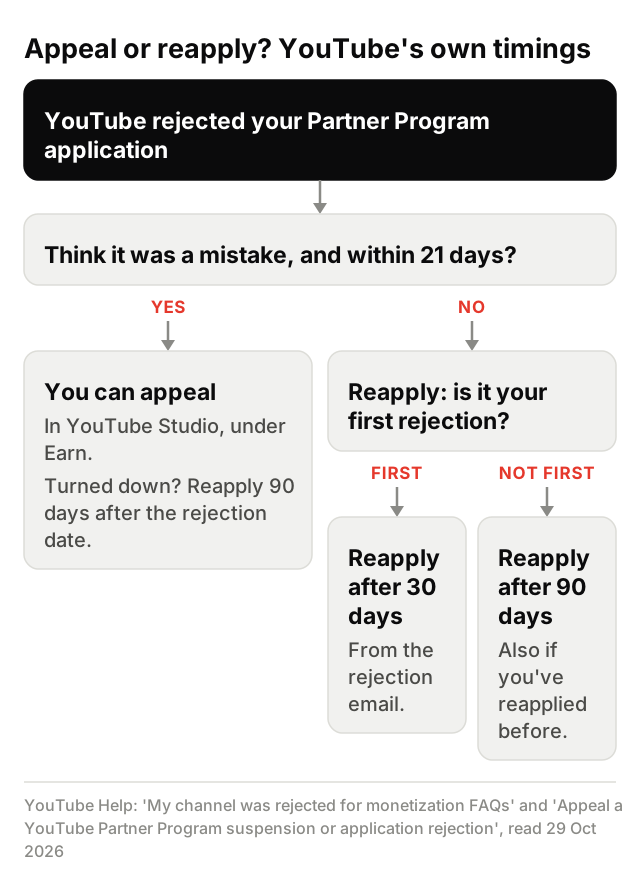
Nobody can promise how an appeal turns out. YouTube's "My channel was rejected for monetization FAQs" page (read 29 Oct 2026) sets the windows: if you think the rejection was wrong, appeal within 21 days; or reapply 30 days after the rejection email (90 days after a later rejection).
A channel suspended from the Partner Program runs on a different clock, which YouTube's appeal page sets. Find your situation in the first column:
| Where you are | What YouTube's help says | YouTube help page (read 29 Oct 2026) |
|---|---|---|
| Application rejected for the first time | Appeal within 21 days, or reapply 30 days after the rejection email. | My channel was rejected for monetization FAQs |
| Rejected again, or you've reapplied before | Appeal within 21 days, however many times you've applied, or reapply 90 days after the rejection email. | My channel was rejected for monetization FAQs |
| Your appeal was turned down | You can still reapply 90 days after your application rejection or suspension date. | Appeal a YouTube Partner Program suspension or application rejection |
| Channel due to be suspended from the Partner Program | Appeal within 7 days before the scheduled suspension date (YouTube Studio shows the date next to Start Appeal). If that appeal is turned down, the channel is suspended and you can't appeal again, but you can reapply 90 days after the suspension. | Appeal a YouTube Partner Program suspension or application rejection |
| Channel already suspended from the Partner Program | If you didn't appeal before the suspension, appeal within 21 days of it. If that appeal is turned down, reapply 90 days after the suspension date. | Appeal a YouTube Partner Program suspension or application rejection |
| Monetization paused, channel still in the Partner Program | Not a policy decision: YouTube pauses monetization when no active, approved AdSense for YouTube account is linked, and it resumes once one is. The page gives no appeal window. If your channel was suspended (demonetized), use the rows above. | Monetization is paused for my channel |
Your channel's status, and the appeal option when YouTube offers it, are in the Earn section of YouTube Studio.
How we checked: on 29 Oct 2026 we read YouTube's rejection FAQ, its appeal page, its paused-monetization page and its channel monetization policies, then put each window next to the page it comes from. Watch the wording on two of them, because they count from different points: the rejection FAQ counts its waits from the rejection email, and the appeal page counts from the rejection date.
How do you appeal a reused-content decision on YouTube?
YouTube's appeal page, "Appeal a YouTube Partner Program suspension or application rejection" (read 29 Oct 2026), gives two routes: a video appeal, if your channel is eligible for one, or Creator Support in YouTube Studio. The page covers any Partner Program rejection or suspension and doesn't name a policy, so the route is the same whether your email cited reused or inauthentic content.
To appeal by video, YouTube lists five steps in this order:
- Sign in to YouTube Studio.
- Upload your appeal video as unlisted and copy the URL.
- Go to Earn for your channel monetization overview.
- Click to start the appeal process.
- Enter the URL for your unlisted video and click Submit.
For Creator Support, go to Earn in YouTube Studio, then Appeal if you think we made a mistake, then Start Appeal. If that option isn't there, the page says to contact Creator Support.
The same page tells you not to delete videos before you appeal, because YouTube assesses the channel as it stands. YouTube says it responds within 14 days, and if the appeal succeeds, the channel is approved or re-approved within 30 days.
What must a YouTube appeal video include?
YouTube's appeal page (read 29 Oct 2026) says what the video's format and status must be, and what it should include:
- Under 5 minutes long.
- Unlisted, a new upload, on the channel you're appealing, submitted from your account.
- Narrated in a supported language, or with English subtitles that aren't auto-generated.
- No appeal information in its description.
- Your channel's URL within the first 30 seconds.
- Specific parts of the policies, with examples of how your channel follows them, covering the channel as a whole, not just single videos.
- How your content was made, such as filming or editing, shown on camera or in voiceover.
We don't give a script or template here. The video has to show your own channel and how you make it.
What if your reused-content appeal is rejected?
If the appeal is turned down, YouTube's appeal page (read 29 Oct 2026) says you can still reapply 90 days after your suspension or application rejection date. If you appealed before a scheduled suspension and it was turned down, you can't appeal again.
Before you reapply, YouTube's "My channel was rejected for monetization FAQs" page (read 29 Oct 2026) asks you to review the channel for policy violations:
- Read the rejection email: it lists the policies the channel broke.
- Check videos, titles, descriptions, thumbnails and tags against the monetization policies and the Community Guidelines.
- Edit or delete the videos that break them.
The YouTube pages read for this guide give no list of edits that pass a review, and neither does this page.
What is reused content on YouTube, and how is it different from inauthentic content?
Reused content, in YouTube's channel monetization policies (read 29 Oct 2026), means channels that repurpose content already on YouTube or another online source without adding significant original commentary, substantive modifications, or educational or entertainment value.
Two lines on that page matter most if you post clips. The policy "applies even if you have permission from the original creator", and it applies "to your channel as a whole". YouTube keeps it separate from its copyright enforcement, so a creator's OK doesn't settle it.
Inauthentic content is the name YouTube gave its repetitious-content policy on 15 Jul 2025, to cover repetitive or mass-produced content. The page no longer has a section by that name: as TechCrunch reported on 20 Jul 2026, inauthentic content now spans three sections, Generic or Repetitive Content, Unsatisfying or Off-putting Content and AI Personas Related to Sensitive Topics. Here is reused content next to the first of them:
| Question | Reused content | Inauthentic content (Generic or Repetitive section) |
|---|---|---|
| What it covers | Content taken from YouTube or elsewhere online without significant added value. | Repetitive or mass-produced content, including videos that look made with a template. |
| Channel or video | The channel as a whole. | The channel: channels whose videos feel interchangeable can't monetize. |
| What permission changes | Nothing: it applies even with the original creator's permission. | Not about permission: in YouTube's examples, the problem is templated or mass-produced uploads. |
| Allowed, in YouTube's examples | Clips in a critical review; reactions with your commentary; edited footage with a storyline and commentary; content mainly featuring the uploader. | The same intro and outro when the rest differs; a series where each video has its own storyline or focus. |
| Not allowed, in YouTube's examples | Moments edited together with little or no narrative; short videos compiled from other sites; promoting others' content, even with permission. | Slideshows, templated storylines or scrolling text with little narrative; AI-made content from generic templates that looks mass-produced. |
| Source | YouTube channel monetization policies, read 29 Oct 2026. | Same page, Generic or Repetitive Content section; the policy was renamed from repetitious to inauthentic content on 15 Jul 2025. |
YouTube's rename notice said the reused content policy, which reviews commentary, clips, compilations and reaction videos, didn't change. The other two sections cover content built on shock or emotionally manipulative formulas, and channels that use AI-made personas presented as human experts on sensitive topics such as health, legal issues, finances or politics.
A disclosure from us: JustClip's AI Video has ready-made presets, and videos made from them at volume can fall under YouTube's inauthentic-content rule. JustClip can't make a channel eligible for monetization.
What has YouTube changed since July 2025?
Four dated changes matter here, as of 29 Oct 2026. We read the first and last on YouTube's own pages; the other two come from news outlets.
| When | What changed | Source |
|---|---|---|
| 15 Jul 2025 | Repetitious content renamed inauthentic content, covering repetitive or mass-produced uploads. Reused content unchanged. | YouTube channel monetization policies, read 29 Oct 2026. |
| 16 Jul 2026, as reported | YouTube set out three kinds of inauthentic content. Its policy page now has matching, undated sections: Generic or Repetitive Content, Unsatisfying or Off-putting Content, AI Personas Related to Sensitive Topics. | As reported by TechCrunch, 20 Jul 2026; the sections from YouTube's policy page, read 29 Oct 2026. |
| Early Oct 2026, as reported | Channels that mainly repost others' videos without significant changes will likely get less Shorts distribution, with no rollout date given. | As reported by Digital Music News, 2 Oct 2026. |
| 1 Feb 2027 | Partner Program updates start, including new entry requirements for channels that apply from that date; channels already in the program aren't affected by those and accept updated terms in YouTube Studio by 31 Jan 2027. YouTube's pages on it don't mention reused content or appeals. | YouTube Blog, 10 Aug 2026, and YouTube Help's "Changes to the YouTube Partner Program", read 29 Oct 2026. |
Does a clipping campaign's permission cover YouTube's reused-content policy?
No. YouTube's channel monetization policies (read 29 Oct 2026) say the reused-content policy applies even with the original creator's permission, and its not-allowed list includes promoting other people's content, even with permission.
JustClip is for your own streams and videos, or footage you're allowed to clip: the creator's campaign or their written OK.
A clipping campaign lets you post a creator's footage, but YouTube still judges your channel as a whole. Campaign clips are paid under the campaign's own rules and may not qualify for YouTube monetization, and JustClip can't change either.
In a campaign, a creator or brand sets the rules and the rate, you post clips that follow them, and the campaign decides which clips it pays for. Campaigns pay; apps don't. JustClip is optional, and you never need it to join a campaign or get paid.
Paid campaign posts are ads, so label them as the campaign, the platform and the law require. Here's what each source says:
- YouTube (YouTube Help, read 29 Oct 2026): you have to tell YouTube about paid promotion by selecting it in the video's details, which adds a disclosure label at the start of the video. On a computer, for a new upload: Show more, then under Paid Promotion select "Yes, my video includes branded content".
- The FTC in the US ("Disclosures 101 for Social Media Influencers", Nov 2019, read 29 Oct 2026): disclose any financial relationship with words like "ad" or "sponsored", put the disclosure in the video itself, not only in the description, and don't assume a platform's tool is enough.
- The ASA in the UK (6 Aug 2026, read 29 Oct 2026): the CAP Code requires ads to be obviously identifiable. It prefers "Ad", advises against "sponsored", says a platform's paid-partnership label may not be enough on its own, and says a YouTube video's title or thumbnail will likely need a label such as "Ad".
Campaigns set their own rates and rules. Many clips earn little or nothing. JustClip doesn't promise earnings.
How do clips of your own streams and videos fit YouTube's policy?
Clips of your own streams and videos sit closest to what YouTube allows: its channel monetization policies (read 29 Oct 2026) list content that primarily features the uploading creator as an allowed example. The channel-as-a-whole test and the inauthentic-content rule still apply.
JustClip is for your own streams and videos, or footage you're allowed to clip: the creator's campaign or their written OK.
If you want to clip your own videos and streams, JustClip returns captioned vertical clips with written hooks, ranked best first, each with a "why this clip" note. Upload the file or paste a Twitch, Kick or YouTube link. YouTube links work on Pro, Studio and pack-only accounts; on Clipper you upload the file.
JustClip can't make a channel eligible for the Partner Program or make a clip original. YouTube makes that call on your channel as a whole.
Reused content kya hota hai? Appeal aur reapply ke YouTube ke apne steps
YouTube ki monetization policies ke hisaab se (padha 29 Oct 2026), reused content matlab YouTube ya kisi aur online source par pehle se maujood content ko bina significant original commentary, substantive changes, ya educational ya entertainment value jode dobara use karna. Ye rule poore channel par lagta hai, original creator ki permission ho tab bhi.
Appeal: agar aapko lagta hai ki rejection galat tha, to rejection ke 21 din ke andar (suspension ke liye upar wali table dekho). Video appeal (agar aapka channel eligible hai) ke liye YouTube kehta hai: video 5 minute se chhota ho, unlisted, naya upload, usi channel par jiska appeal hai, aur supported language (jaise Hindi ya English) mein narration ho, ya English subtitles jo auto-generated na hon. Pehle 30 second mein channel ka URL dikhao. Policies ke specific parts aur poore channel ki baat karo, aur dikhao ki content kaise banta hai. Description mein appeal ki info mat daalo. Hum koi script ya template nahi dete.
Reapply: pehli rejection email ke 30 din baad, warna 90 din baad. Appeal reject hua to rejection ya suspension date ke 90 din baad. Pehle rejection email padho aur videos, titles, descriptions, thumbnails aur tags check karo. Approval ka promise koi nahi kar sakta.