For creators 18+: never use a real person's face, body or voice without their consent, label AI-made people the way TikTok, Instagram and YouTube each require, and know that AI video comes with no promise that every frame matches.
The short answer for each platform, from its own help (read 2 Nov 2026):
- TikTok: turn on the AI-generated content setting under More options (video) or Post settings (photo). It's required for AI-generated or significantly edited content that shows realistic-looking scenes or people.
- Instagram: tap the toggle next to Add AI label when you create a post or reel. Meta requires it for photorealistic video or realistic-sounding audio that was digitally generated or altered, not for images.
- YouTube: in YouTube Studio's Attributes section, under "AI use", select Yes. YouTube requires it for AI-generated or altered content that seems realistic.
Below, a tree sorts what you made by each platform's rules, and a table shows where every setting sits. Every rule here comes from the platform's own help or guidelines, or from the official legal text, read on 2 Nov 2026. The sources at the end list each one by title.
How do you label AI content on TikTok? (TikTok's help, read 2 Nov 2026)
Turn on the AI-generated content setting on the post screen before you post. TikTok's Community Guidelines (Integrity and Authenticity, released 25 Aug 2026, effective 24 Sep 2026, read 2 Nov 2026) say: "we require creators to label AI-generated or significantly edited content that shows realistic-looking scenes or people."
What counts as AI-generated content on TikTok? TikTok's Help Center article "About AI-generated content" (read 2 Nov 2026) says AI-generated content (AIGC) includes "images, video and/or audio that is generated or modified by artificial intelligence": fully AI-made videos, and real footage that AI has altered. The same article says TikTok requires creators "to label all AI-generated content that contains realistic images, audio, and video".
For a video, TikTok's help gives these steps in the app:
- Tap the Add post + button at the bottom of the screen.
- Record your video, then tap the Continue button. You can also upload a video from your device.
- Tap Next.
- Tap More options (...), then turn on the AI-generated content setting.
For a photo: tap Add post +, capture your photo, tap Post settings at the bottom and turn the AI-generated content setting on. TikTok's help gives app steps only. It doesn't describe turning the setting on from a computer, so this guide doesn't give a desktop route.
Once the setting is on, the post shows the label "creator labeled as AI-generated". TikTok's help also accepts other disclosure on the post itself: "adding text, a hashtag sticker, or context in the post's description". One warning from the help: misleadingly putting this label on unaltered content "is a violation of our Terms of Service and may result in the removal of content."
Does TikTok add its own AI label?
Sometimes. TikTok's help (read 2 Nov 2026) says it "may automatically apply the "AI-generated" label" when a creator uses TikTok AI effects, or uploads AI-generated content that has Content Credentials attached, a technology from the Coalition for Content Provenance and Authenticity (C2PA). If you used only TikTok's effects, you may not need your own label; if you also changed the video with AI yourself, TikTok still asks for it. Once an auto label is on a post, the help says you won't be able to remove it.
What needs an AI label? A dated tree across TikTok, Instagram and YouTube
Content that looks or sounds real and was made or altered with AI needs your label on all three platforms; cartoon or anime styles and small fixes usually don't, and Instagram doesn't require your label on images (each platform's own help or guidelines, read 2 Nov 2026). To answer "Do I have to label this?", start with what you made, then check each platform's rule.
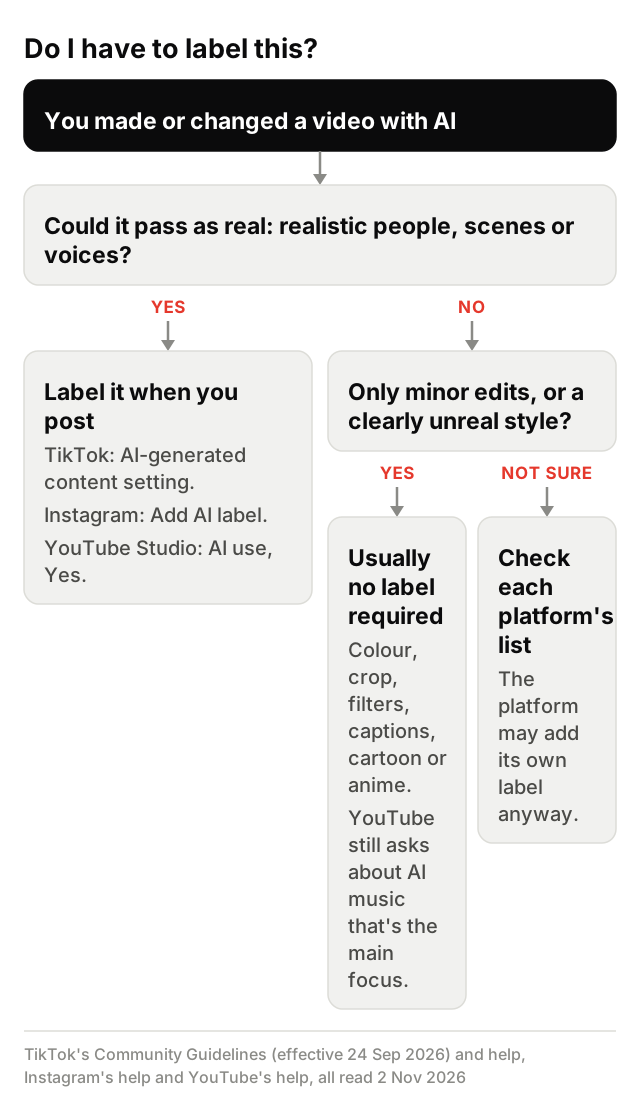
- An AI character or an AI voice. If it looks or sounds real, label it on all three: TikTok covers realistic-looking people, Instagram photorealistic video and realistic-sounding audio (a reel with a realistic AI voiceover is its own example), YouTube realistic AI content. A cartoon or anime style is different: TikTok needs no disclosure for "artistic styles, like anime", and YouTube exempts non-realistic content. TikTok needs disclosure when "AI-generated audio mimics the voice of a real person", but not for generic text-to-speech.
- AI-edited real footage. Consent comes before any label: swap or motion only with your own photos, your AI characters or people who agreed. Then label it. TikTok needs disclosure when "A face is replaced with someone else's"; YouTube when content "Makes a real person appear to say or do something they didn't do"; Instagram for photorealistic video that was digitally altered. A label doesn't make everything allowed: TikTok doesn't allow "Using the likeness of private figures without consent".
- AI B-roll inside a clip. Realistic AI shots in a real video count too. YouTube lists "AI generated extra footage of a real place" as content to disclose, and TikTok needs disclosure when "A background, object, or person is added or removed in a misleading way".
- A filter or effect. Small fixes usually don't need your label: TikTok lists "small edits like color correction, reframing, or cropping", and YouTube treats beauty filters, colour and lighting filters and captions as minor edits. But TikTok labels content made with its own AI effects automatically, and Instagram's help says AI photo editing tools "may add a signal" that Meta's systems read.
| TikTok | YouTube | ||
|---|---|---|---|
| Label viewers see | "creator labeled as AI-generated" (TikTok's own: "AI-generated") | "AI content label" in Instagram's help; "AI info" in Meta's Transparency Center (updated 19 Feb 2025) | Labeled as AI generated or altered, in the expanded description or the player |
| When your label is required | AI-generated or significantly edited content showing realistic-looking scenes or people | Photorealistic video or realistic-sounding audio, digitally generated or altered; not images | Realistic content made or altered with AI, and AI music that's the main focus |
| Where the setting is | App: More options on the post screen (video), Post settings (photo) | App: Add AI label toggle on posts and reels; Stories: Options, then Label AI | YouTube Studio, Attributes, "AI use": select Yes (computer or mobile) |
| Adds its own label? | Yes: TikTok AI effects, or Content Credentials (C2PA) | Yes: industry-standard AI signals, third-party AI tools included | Yes: YouTube's GenAI tools, C2PA metadata, or its internal systems |
| If the label is wrong | The help gives no route; an auto label can't be removed | The help gives no route | Select No under Attributes, except for YouTube AI tools, C2PA metadata or manual review |
| Source | TikTok Help Center, "About AI-generated content"; Community Guidelines, Integrity and Authenticity | Instagram Help, "Label AI content on Instagram"; Meta Transparency Center, "Labeling AI Content" | YouTube Help, "Disclosing use of GenAI content" |
How do you add an AI label on Instagram, and when does Meta require it? (Instagram's help, read 2 Nov 2026)
Tap the toggle next to Add AI label when you create a post or reel. Do you have to disclose AI on Instagram? For video and audio that seem real, yes. Instagram's help article "Label AI content on Instagram" (read 2 Nov 2026) says: "Meta requires you to label content you share that has photorealistic video or realistic-sounding audio that has been digitally generated or altered, including with AI." Images are the exception: "Meta does not require you to label images that have been created or altered with AI", though they "will still receive a label if Meta's systems detect they were AI-generated." The same page adds: "There may be penalties if you do not label content as required."
The same help page puts the toggle here:
- Posts: create a post, then tap the toggle next to Add AI label.
- Reels: create a reel, then tap the toggle next to Add AI label.
- Stories: share a photo or video to your story, tap Options, then Label AI, then tap the toggle next to Add AI label.
- Your profile: go to your profile, tap Edit profile, then tap the toggle next to AI-generated profile.
It's an app setting: viewed on a computer, the help page says "This feature isn't available on computers". A labelled post shows an AI content label; a labelled profile shows an AI-generated profile label. The help says labelling "is different for ads", so this guide covers ordinary posts only.
How do you disclose AI on YouTube? The 'AI use' setting in YouTube Studio (YouTube's help, read 2 Nov 2026)
Select Yes under "AI use", in the Attributes section, when you upload in YouTube Studio. If you searched for YouTube's altered or synthetic content setting: in YouTube's help, read 2 Nov 2026, the page is titled "Disclosing use of GenAI content" and the setting is called "AI use". The rule: "We require creators to disclose AI-generated or altered content that seems realistic." YouTube says creators must disclose GenAI content that:
- Makes a real person appear to say or do something they didn't do.
- Alters footage of a real event or place.
- Generates a realistic scene that didn't actually occur.
- Creates music that's the main focus of the video.
You don't need to disclose "non-realistic content that's made with AI, or edits to realistic content that are minor". Its minor edits include using generative AI for a script, title or thumbnail, upscaling, and gameplay footage from video games.
To disclose on a computer, YouTube's help gives these steps:
- Go to YouTube Studio.
- Follow the steps to upload content.
- In the Attributes section, under "AI use", select Yes if your content meets the disclosure requirements.
- Continue to select other video details.
The setting is in YouTube Studio "on a computer or mobile device". Photorealistic content and AI music may also get a label in the video player; other AI content may get it in the expanded description. Creators who "consistently choose not to disclose" may get a label applied manually, or penalties "including removal of content or suspension from the YouTube Partner Program."
Do you have to label AI content? What TikTok, Instagram, YouTube and the law require
On the platforms, yes, for realistic content: TikTok requires it for realistic-looking AI scenes or people, Instagram for photorealistic video and realistic-sounding audio, and YouTube for realistic AI content. The tree above shows where your video falls. The law is a separate question. This guide quotes two texts, the EU AI Act and California's SB 942, and only who each one puts duties on, from the official texts read 2 Nov 2026. It's not legal advice, and it isn't a verdict on whether either text applies to you.
The EU AI Act (Regulation (EU) 2024/1689, the Official Journal text, read 2 Nov 2026):
- Who has the duty: Article 50(4) says: "Deployers of an AI system that generates or manipulates image, audio or video content constituting a deep fake, shall disclose that the content has been artificially generated or manipulated."
- Deployer: Article 3(4) defines a deployer as a person or body "using an AI system under its authority except where the AI system is used in the course of a personal non-professional activity".
- Deep fake: Article 3(60) defines a deep fake as AI-made or manipulated content that "resembles existing persons, objects, places, entities or events and would falsely appear to a person to be authentic or truthful".
- Artistic or fictional work: for "evidently artistic, creative, satirical, fictional or analogous" work, Article 50(4) limits the duty to disclosing that such content exists, "in an appropriate manner that does not hamper the display or enjoyment of the work."
- When it applies: Article 113 says the Regulation "shall apply from 2 August 2026", and its exceptions for earlier and later dates don't include Article 50. The later Regulation (EU) 2026/1744 leaves Article 50(4) and that date unchanged.
California's SB 942, the California AI Transparency Act (Business and Professions Code section 22757 and after, as it reads in the Legislature's official data, read 2 Nov 2026). Among those it puts duties on are covered providers, which section 22757.1(e) defines as "a person that creates, codes, or otherwise produces a generative artificial intelligence system that is publicly accessible within the geographic boundaries of the state." Section 22757.6 says: "This chapter shall become operative on August 2, 2026."
Why does my video say AI-generated when I didn't use AI?
If you didn't turn on a setting and a label appeared, the platform added it itself. TikTok, Instagram and YouTube each label some content automatically: TikTok and YouTube name Content Credentials (C2PA metadata) as a trigger, Instagram names industry-standard AI signals, and YouTube also names its own detection systems. Here's what each help page says, read 2 Nov 2026.
TikTok. Its automatic "AI-generated" label has two named triggers: TikTok AI effects, and uploads with Content Credentials (C2PA) attached. The help doesn't say which editing apps attach them. Once a post has an auto label, "you won't be able to remove the label from your post", and the article gives no feedback or appeal route for one you think is wrong. Does TikTok penalize AI-generated content? On your own label, TikTok's help says: "Turning on the AI-generated content setting won't affect the distribution of your video as long as it doesn't violate our Community Guidelines." More on reach in the next section.
Instagram. Instagram's help says content "with industry-standard signals indicating that it was created with AI will be labeled", including content "created using third-party AI tools", and that photo editing tools that use AI to change the size or colour of an image "may add a signal". AI-modified content doesn't get the label on the post; the details sit in the Options menu. Instagram's help calls the label an "AI content label"; Meta's Transparency Center page "Labeling AI Content" (updated 19 Feb 2025) says labels "are now displayed as "AI Info."" Instagram's help gives no route to dispute a label you think is wrong.
YouTube. YouTube may add an AI label itself for content made with YouTube's GenAI tools, content that contains C2PA metadata, and content its internal systems detect as AI-generated or altered, and it notifies you in YouTube Studio. Of the three, YouTube's help alone gives a fix: "If our systems make an error, creators will have the ability to change AI disclosure in most cases by selecting No in the AI disclosure survey under "Attributes" in YouTube Studio." The exceptions: "content made with YouTube's AI tools, content containing C2PA metadata, or content labeled after manual review can not be adjusted."
If the label is accurate, leave it: it's what the platform asks for.
Do AI labels or AI accounts lose reach?
Not because of the label alone, in TikTok's and YouTube's own words (their help, read 2 Nov 2026). TikTok: "Turning on the AI-generated content setting won't affect the distribution of your video as long as it doesn't violate our Community Guidelines." YouTube: "Disclosing AI content alone won't limit a video's audience or impact its eligibility to earn money." The risk comes from not labelling: TikTok's guidelines say unlabelled content "may be removed, restricted, or labeled by our team, depending on the harm it could cause", and YouTube may penalise creators who keep skipping disclosure. Neither quote promises reach or earnings either way.
For AI channels, YouTube has a second rule to know about. Its channel monetization policies (read 2 Nov 2026; the newest dated note there is 15 Jul 2025) renamed "repetitious content" to "inauthentic content", to make clear it covers content that is "repetitive or mass-produced". Channels must "Not be mass-produced, generic, repetitive, or manipulative", and the policy lists "AI-generated content made with generic or unoriginal templates giving the impression of mass production" as not allowed to monetize. The rule can catch template-made AI videos posted at volume from any tool, JustClip's AI Video presets included. The same policy names, as an example of what's allowed to monetize, "using AI to visualize a unique character and narrative you invented".
Does TikTok allow AI influencers, or ban AI accounts?
TikTok's Community Guidelines (Integrity and Authenticity, released 25 Aug 2026, effective 24 Sep 2026, read 2 Nov 2026) have no rule against AI accounts as such. They require creators to label realistic AI-generated content, and they allow "Humor or art, such as a spoof, meme, or TikTok dance". Some things aren't allowed even with a label. TikTok's guidelines and help list:
- "The likeness of young people under the age of 18, or the likeness of adult private figures used without their permission."
- Fake authoritative sources or crisis events, or content that falsely shows public figures in certain contexts, such as endorsing a product.
- AI-generated content that's misleading about matters of public importance or harmful to individuals.
The same page's rules on deceptive behaviour apply to every account: "If your account is restricted or banned, you may not create or use another account to get around it." TikTok decides each case under these rules, so this guide can't promise how any account will be treated.
Do you need to label what you make with JustClip's AI tools?
Yes. Label anything you make with JustClip's AI tools when you post it, with each platform's own AI label. JustClip is an AI clipping and AI video tool, and JustClip's AI tools for characters and talking videos make the kind of content this guide is about. TikTok, Instagram and YouTube ask for their own setting, whatever a tool does or doesn't attach to the file.
- AI Video's talking videos. Multi-shot videos with voices and lip sync, made on Wan 3.0. If the character looks or sounds real, all three platforms ask you to label it.
- AI Studio's tools inside a clip. Anything they change or add in a clip that looks realistic falls under the AI-edited real footage and AI B-roll branches of the tree above.
JustClip's AI tools are for adults, 18+. Never use a real person's face, body or voice without their consent. Label AI-made people the way each platform requires: TikTok, Instagram and YouTube each have their own setting, shown above. AI output varies, and there's no promise that every frame matches.
Last comes AI Influencer, where you create a character of your own. A made-up person you post as is an AI-made person, so turn on TikTok's AI-generated content setting, Instagram's Add AI label and YouTube's "AI use" answer each time a realistic one appears, and consider Instagram's AI-generated profile label for an account built around them.