Why is the YouTube Clip button missing? YouTube's April 2026 announcement on Clips (checked 23 Nov 2026)
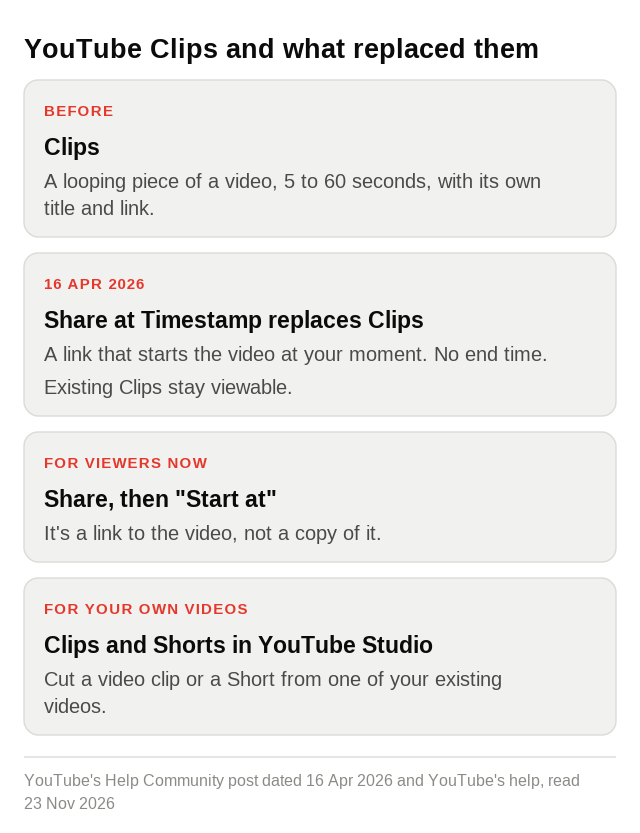
If the Clip button is missing under a YouTube video, the explanation YouTube has published is its own announcement that Share at Timestamp is replacing the Clips feature. A TeamYouTube account carrying the Google Employee badge posted it in the YouTube Help Community on 16 April 2026, under the title "Updating how you share video moments" (read 23 Nov 2026). The same post brings Share at Timestamp, which already existed on desktop, to the YouTube mobile app.
Share at Timestamp will become the main way to share specific moments in videos
TeamYouTube, YouTube Help Community announcement, 16 Apr 2026 (read 23 Nov 2026)
What YouTube's announcement of 16 April 2026 says about Clips, and what it leaves out (read 23 Nov 2026):
- Share at Timestamp takes over. The sentence quoted above goes on to say it replaces the Clips feature.
- Existing Clips will still be viewable.
- Two options go away: setting an end time, and adding a custom description when you share.
- It doesn't say when the Clip button stops working, or whether every account loses it at the same time. The announcement is dated 16 April 2026 and names no switch-off date.
YouTube's help article "Learn about managing Clips" doesn't reflect the announcement. When we read it on 23 Nov 2026, it still listed the old steps for making a Clip and didn't mention the April 2026 announcement or Share at Timestamp. If those steps don't match what you see under a video, the announcement explains the gap. The article's first paragraph does point creators to YouTube Studio for clipping their own videos.
How we checked: on 23 Nov 2026 we read the announcement in a browser, along with four YouTube help articles, all listed in the sources. For "Learn about managing Clips" we read the Computer and Android tabs, and for "Share videos and channels" the Computer tab and the iPhone and iPad tab. Where those pages don't say something, this guide says so.
Why did YouTube replace Clips? What the announcement says, and only that
YouTube's announcement of 16 April 2026 (read 23 Nov 2026) doesn't set out a list of reasons for replacing Clips with Share at Timestamp. It makes three points alongside the change:
- It describes Clips and Share at Timestamp as very similar tools.
- It calls community clipping an important way for creators to reach new audiences, and says third-party tools with advanced clipping features, and authorized creator programs, now exist for it across video platforms.
- It says YouTube is focused on launching more clipping tools for creators in 2026. Video Clips is in YouTube Studio today, for republishing clips from longer videos and archived live streams, and the announcement says Video Clips to Shorts and auto-suggestions for clippable moments would follow later in the year.
The announcement says nothing more about why, and the YouTube help articles we read on 23 Nov 2026 don't add a reason. One of them, "Video Clips & Shorts in YouTube Studio", describes the Studio tool as making Shorts as well as video clips, with AI-powered suggestions where they're available.
Where are your existing YouTube Clips now?
Clips made before the change are in YouTube's Clips library, and YouTube's announcement of 16 April 2026 says existing Clips will still be viewable. YouTube's help article "Learn about managing Clips" (read 23 Nov 2026) says where to find them:
- On a computer, look in the left menu for Your Clips, under the You section.
- In the YouTube app, open the You tab, then Your Clips.
- If you're the creator, open Content in YouTube Studio, select a video, then Clips. You can view, play and share the Clips made from your videos.
The same help article ties every Clip to its original video. Clips are public: anyone with access to a Clip can watch it, provided they can also watch the original video, and if the original video is deleted, set to private or found to break YouTube's Community Guidelines, its Clips go with it. Clips made from unlisted videos remain available.
Why was the YouTube Clip button missing before the April 2026 change? Three older reasons
YouTube's help article "Learn about managing Clips" (read 23 Nov 2026) still prints three older reasons a viewer couldn't make a Clip: the creator had turned clipping off, the creator had put that viewer on the channel's Hidden users list, or the live stream had no DVR or ran longer than its DVR timeframe. These are separate from the April 2026 change, in which Share at Timestamp replaces the feature.
| Older reason | What it meant | YouTube's page (read 23 Nov 2026) |
|---|---|---|
| The creator turned clipping off | Clipping is on by default, the article says. A channel could switch it off in YouTube Studio: Settings, Channel, Advanced Settings, then unticking Allow viewers to clip my content. | Learn about managing Clips |
| The creator put you on the Hidden users list | A channel could add a viewer to its Hidden users list to stop that viewer making Clips of its videos or live streams. | Learn about managing Clips |
| The live stream had no DVR, or ran longer than its DVR timeframe | Clips couldn't be made from a live stream without DVR, or from one longer than the DVR timeframe. Clips of a live stream showed up after it finished and was uploaded as a video. | Learn about managing Clips |
You may have seen made-for-kids videos given as another reason. YouTube's pages read on 23 Nov 2026 don't list made-for-kids as a reason: its audience page, "Set your channel or video's audience", doesn't mention Clips.
Live streams have their own rules and tools, so they get a separate guide on how to clip a live stream on YouTube.
What was the YouTube Clip length and time limit, and what does Share at Timestamp do instead?
A YouTube Clip was a piece of a video, 5 to 60 seconds long, that played on a loop from the original video's watch page. That's according to YouTube's help article "Learn about managing Clips", which still printed those figures on 23 Nov 2026. Share at Timestamp has no length at all, because it makes a link and not a separate piece of video.
| Tool | What it makes | Length or time limit | Source (read 23 Nov 2026) |
|---|---|---|---|
| Clip (the viewer feature being replaced) | A piece of the video that played on a loop from the original video's watch page, with a title of up to 140 characters. | 5 to 60 seconds. | Learn about managing Clips, which still prints these figures |
| Share at Timestamp | A link that starts the video at the moment you choose. It's a link, not a copy. | A start time only: no end time and no custom description. | YouTube's announcement of 16 Apr 2026; Share videos and channels, where the option is labelled Start at |
| Video Clips and Shorts tool in YouTube Studio | A separate video clip or a Short, cut from your own existing video. | The help page doesn't state a length limit for this tool. | Video Clips & Shorts in YouTube Studio |
What can you use instead of YouTube Clips? Share at Timestamp, and clipping your own videos
The alternative to Clips that YouTube names is Share at Timestamp, a link that starts a video at the moment you choose. It's the route for someone else's video, because it shares a link and makes no copy. In YouTube's help article "Share videos and channels" (read 23 Nov 2026), the option is labelled Start at.
To share a moment from a computer:
- Start watching the video on youtube.com.
- Under the video, click Share.
- Tick the Start at box and enter the start time, for example 2:30 for 2 minutes and 30 seconds.
- Copy the link.
To share a moment from an iPhone or iPad (the tab of the help article we read for phones):
- Move to the moment in the video you want to share.
- Under the video player, tap Share.
- Turn on the toggle that shows the minute and second, such as 2:30.
- Tap Copy link, or pick an app to share the link.
Whoever opens the link starts watching at that moment. There is no end point, and YouTube's help (read 23 Nov 2026) doesn't say whether Start at works while a stream is still live.
Is the video yours? Clipping your own videos into Shorts in YouTube Studio or any editor
If the video is on your own channel, use the Video Clips and Shorts tool in YouTube Studio. It cuts segments out of your long videos and publishes them as separate video clips or Shorts, according to YouTube's help article "Video Clips & Shorts in YouTube Studio" (read 23 Nov 2026).
Your own streams and videos, or footage you're allowed to clip (the creator's campaign or their written OK).
To make a Short with the tool, the help article lists these steps:
- In YouTube Studio, select Content, then Videos.
- Click the existing video you want to use.
- In the left-hand menu, select Clips and Shorts.
- Click Create clip or Short and choose Short.
- Pick the part: select text in the transcript, or enter timestamps in the timeline editor.
- Click Preview Short, then Create Draft, and complete the standard upload dialog to publish.
If AI-powered suggestions are available to you, they appear in the left panel; YouTube offers them in select countries and languages. For a separate video clip, choose Video clip at step 4; the help article then has you select Create draft and finish uploading the video, with no Short preview. YouTube's tip is to link the source video in the clip's description.
The same help article says you won't be penalized for using your own content in a video clip or Short. It describes an existing video and says nothing about a stream that's still live.
Any editor does the same job on a file you own. You trim the moment, crop it to vertical and add captions. Our longer guide covers how to make Shorts from your own long videos. For a video that isn't yours and that you have no permission to clip, share a Start at link instead.
Your own streams and videos, or footage you're allowed to clip (the creator's campaign or their written OK).